Omet navegació

1.3 Add subtitles to videos

Adding subtitles

In order to promote inclusion and provide accessible language and environment for all students, we have the option to integrate subtitles into the educational videos we are creating. These will be used for students with hearing impairments or comprehension difficulties, as well as for newly arrived students or families.

Down below we detail the steps to follow to add subtitles to a video.

Step 1: video transcription

The first step would be to transcribe the video in Catalan.

CEP IBSTEAM. Transcribe video in Catalan

Step 2: add the subtitles to the video

Second step would be to add the subtitles to the video.
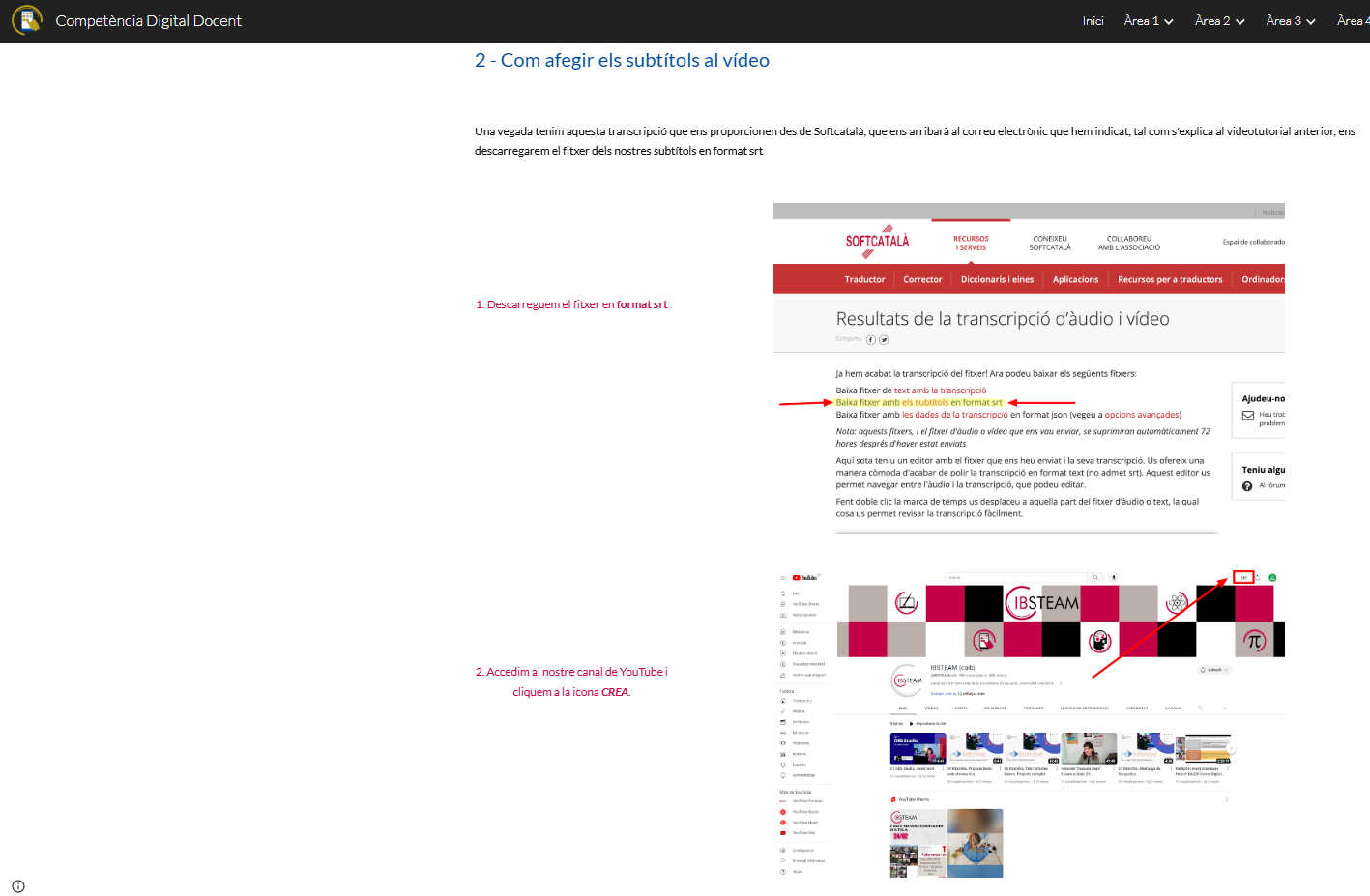
Add subtitles to the video
CEP IBSTEAM. Add subtitles to the video (CC BY-NC-SA)

What to take into account when subtitling self-produced videos

Certain factors must be considered both during recording and when generating subtitles to ensure that they can be understood by everyone. Therefore, following guidelines 1 and 2 of the UDL, we provide you with a document that serves as a checklist, including instructions on the positioning of spatial and temporal elements, as well as orthotypographic and linguistic aspects. 

What to take into account when subtitling videos
Projecte REA DUA Andalusia. What to take into account when subtitling videos (CC BY-NC-SA)

Creat amb eXeLearning (Finestra nova)